WA Home

WA Home
Please click on the picture to go to the MYP Technology Website

Thursday, May 3, 2012

G9 Tech Class #40

Class # 40!!! :-)

Today we will start with Create stage!


For this stage it is super important to look into these:
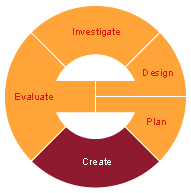

1. Your complete Process Journal with :
  • dated journal entries including Visual Evidence (designs, sketches, screen shots, pictures, etc that show how the steps you took to create the product)
  • notes regarding any changes you needed to make to Design and/or Plan: e.g. added a step, changed the order of scenarios/objects, changed the message, used another resource, didn't need a resource, didn't finish what was planned etc.
  • how did the group work? Did you have any issues? how did you overcome them, if any?
2. Explain what tools and techniques you used to create your product
3. How was your time management: Have you followed your time plan? How?
4. Have you made any changes to your chosen design? Why? How?
5. Complete your public announcement/animation following your chosen Design! :-) 

You can always use the Design Folder Checklist to make sure your Create stage is complete.

Keep an eye on the Due Dates for Project 2 to stay on task.

Don't forget to make your journal entry of the day and  include in it all the screenshots of the process of creating your final product as visual evidence!


Tuesday, May 1, 2012

G9 Tech Class #39

Today, we are back in our classroom and we will:

Friday, April 27, 2012

G9 Tech Class #38

Due to TAKS and STAAR testing we will have classes as follows:

  • 1st period in DP1
  • 3rd period in room #205
If you have not submitted Design stage on April 24, you can turn it in today for 50% of the grade. For details on Design stage please visit: G9 Tech Class #36

Today we will start working on Plan stage.

In Plan stage you will be defining what will be done, when, how, by who and with what resources. 

Focus on the process of creation of the final product: 

A public announcement for young children that relates to at least 5 Learner Profile Traits and is made in Alice.

Remember to include:
  • detailed step by step list of instructions to put together your animation  (like giving very detailed instructions for someone else to do it for you!) 
  • a detailed timeline (for the process of building/creation): include a Gantt and/or a CPM (Critical Path Method usually used together with PERT
  • what resources you will be using
  • Look at Due Dates for Project 3 and plan accordingly.
  • For more info on Plan stage and tools to complete it, please revisit: G9 Tech Class #10


Complete your Process Journal! Make your daily record of what you  learnt/progressed today.

Wednesday, April 25, 2012

G9 Tech Class #37

Due to TAKS and STAAR testing we will have class in DP1.

Today we will continue working on Design stage. Please visit G9 Tech Class #36 to review the expectations for this stage.


Look at Due Dates for Project 3 and plan accordingly. Design stage is due today.

Don't forget to make your journal entry of the day. Based on today's progress, I would suggest including the sketches of your designs as visual evidence!

Monday, April 23, 2012

G9 Tech Class #36

Following the Due Dates for Project 3 we will start working on Design stage today.


Please organize your group members' roles to start working on Design stage. 


For this stage, remember to come up with different options for your public announcement, and choose one.


  • Include a variety of different designs for you public announcement/animation (at least 3)
  • Include a sketch for each design
  • Explain every part of each design
  • For explaining your designs, please use different techniques like story boards, graphs, labelled diagrams with explanations, etc.
  • Evaluate each design critically against the design specifications (assess what design specs that you listed in Investigation stage, each design meets or not)
  • Choose one design to program using Alice
  • Justify your choice of design that you will be programming
  • Look at Due Dates for Project 3 and plan accordingly.

  • Don't forget to make your journal entry of the day. Based on today's progress, I would suggest including the sketches of your designs as visual evidence!

    Thursday, April 19, 2012

    G9 Tech Class #35

    Continuing with what we worked on last class: G9 Tech Class # 34 please complete your Investigation stage.


    Remember that:

    ------------------------------------------------------------------------------------------
    Thought this would be interesting for you! :-)

    Adobe Youth Voices Aspire Awards

    Adobe Youth Voices is the signature philanthropic effort of the Adobe Foundation intended to empower youth and educators through media making experiences that promote social change. As a part of this effort, the Adobe Youth Voices Aspire Awards celebrates the extraordinary work of young media artists from around the world by recognizing top talent in media production. More Information......

    Tuesday, April 17, 2012

    G9 Tech Class # 34

    Continuing in our Project 3, we will specify a couple details regarding the project.

    The challenge: Make a public announcement that integrates the IB Learner Profile Traits for a young children audience using Alice.

    To complete your Investigation stage, please include:

    • state the problem - > 'Challenge'
    • design brief
    • relate to yourselves, community and AOIs
    • answer guiding questions listed iG9 Tech Class #32
    • add your own questions (at least 4)
    • interview/ask our PYP teachers what information/announcement they suggest you can portray to their students
    • investigate what are public service announcements and how they work
    • include examples of public announcements
    • Some Design specs are the following, but you need to add your own:
      • announcement (animation/game) should be aprox 2 minutes long
      • use at least 5 of: Do Together, Loop, If/Else, Do in Order, While, For all in orderFor all together
      • include at least: 5 objects, 10 methods and 3 events
    • you can use the G9 Shared doc on Investigation Draft to complete your Investigation stage
    • follow the Due Dates for Project 3 to stay on task
    • include the Assignment Standards
    • check the  Design Folder Checklist to cover all the content expected for Investigation