WA Home

WA Home
Please click on the picture to go to the MYP Technology Website
Showing posts with label programming. Show all posts

Monday, May 21, 2012

G9 Tech Class #45

Today,
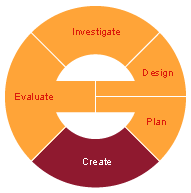
be prepared to test and present your animation to gather information and feedback for your Evaluate stage.

Remember that you animation needs to be less than 2 minutes and include at least 5 Learner Profile Traits.

Please visit G9 Tech Class #41 to make sure you have a complete Create stage and animation.

Tuesday, May 15, 2012

G9 Tech Class #44


Today please continue to work on Create stage developing your animation including at least 5 Learner Profile Traits.


Please visit G9 Tech Class #41 to make sure you have a complete Create stage. 

Please check the Due Dates for Project 2 to stay on task.
Your process journal is due today and next class you need to present your animation, even if you think you still need to work on it :-)

Don't forget to make your journal entry of the day.


Wednesday, May 9, 2012

G9 Tech Class #42

Hope you had a good testing morning!


Today please continue to work on Create stage developing your animation of a public announcement including at least 5 Learner Profile Traits.


Please visit G9 Tech Class #41 for details on Create stage.


Don't forget to make your journal entry of the day and  include in it some screenshots of the process of creating your animation as a record of visual evidence!


Here are a couple Pics from Boston :-)

Friday, April 13, 2012

G9 Tech Class #33

Today we will continue learning about Alice.


  • launch Alice in your laptop
  • visit the Tutorial (if you have not done so before)
  • load one of the worlds that already contains a few objects, for example: Ice
  • add an object to your 'Alice world'. You can use the online gallery of objects and drag and drop it in the 'Alice world.' For example: a skater
  • test the methods the object knows (use right click on the object to call the object's methods)
  • by selecting the object in the object tree we will get a list of the animations the object knows how to do) 
  • to get the object to 'move', drag move on to your MyFirstAnimation. 
  • when you drop 'move' you will get a menu to specify the details. For example: Forward, 1 meter
  • test by Playing your world and see what the skater does. 
to continue with sequencial programming we will add more:
  • make the skater turn left 1 revolution (complete turn)
what does the skater do now?

To address concurrency, we can make the skater perform two activities simultaneously:
  • Use Do Together to execute all the methods inside simultaneously:
  • at the same time the skater moves forward, make her raise her left leg
To address repetition, you can make the skater turn multiple times
  • Use Loop to make the skater  turn 3 times.
If you would like the skater to perform a task based on specific situation, you can use If 


Please continue to test different ideas!

For today, please create a method  that will have the following specifications:
  • use an existing world
  • insert an object
  • make the object perform at least 5 different things
  • use Do Together, If and Loop for the object to compete a specific task (retrieve another object, perform an action: skate, dance, walk, etc)


Wednesday, April 11, 2012

G9 Tech Class #32

Today we will experience how to create programs on a TI 93 Graphing Calculator. Please follow the links to view the exercises:

If you are able to use the specific programming instructions and you get to the expected results, take a picture of the calculator (& yourself if you want to) to add to your Process Journal as evidence! :-)


Continuing with what we began last class G9 Tech Class #31, we will move forward developing Investigate stage.

Remember to visit the official Alice Site and the Alice Blog to get started. You can download Alice from Download Alice 2.2 if you will be using your own laptop. Once it is installed, launch it and visit the Tutorial :-)

At this point, focus on the following parts of Investigation:


Continue looking into the following:
  • What is a programming language?
  • What is Alice?
  • Who created Alice?
  • What is Alice for?
  • When was Alice first released?
  • What is Alice's interface like?
  • What other Programming languages does Alice relate to?
  • How many versions have been released?
  • add your own questions... (at least 3 or 4)


For Investigation stage, please: 
  • Get in new groups with people who you have not worked with before
  • Use the listed questions (in red) as an introduction to Project 3: Investigation
  • When working on your Investigation stage  document, please remember to:
    1. What do you think you will learn during this project?
    2. Relate it to yourself, the society, AOIs
    3. Answer the questions to begin your research
    4. Add more questions
    5. Cite your sources
    6. Include your reflections on the two activities we did last class: Taboo & Giving the 'robot' instructions.
Don't forget to make your Process Journal journal entry of the day

Monday, April 9, 2012

G9 Tech Class #31

Today we will start our Project 3 3D programming

Today we will start investigating the basic concepts of this specific programming language: Alice. But let's start at the beginning and think about: how do we give (step by step) instructions? 

Let's see this example: Making Smores 

We will Play Taboo and Give the teacher- Robot instructions to get started.


What are your thoughts on these two activities?


Next ideas to explore: 

  • what is programming? 
  • what is a programming language?
Some context info regarding Alice:  Alice is an innovative 3D programming environment that makes it easy to create an animation for telling a story, playing an interactive game, or a video to share on the web. Alice is a teaching tool for introductory computing. It uses 3D graphics and a drag-and-drop interface to facilitate a more engaging, less frustrating first programming experience. 

"What Is Alice?" Alice.org. Carnegie Mellon University, 2012. Web. 08 Apr. 2012. <http://www.alice.org/index.php?page=what_is_alice/what_is_alice>

You can visit the 
official Alice Site and the Alice Blog to get started. You can download Alice from Download Alice 2.2 if you will be using your own laptop.


Look for the following information:
  • What is a programming language?
  • What is Alice?
  • Who created Alice?
  • What is Alice for?
  • When was Alice first released?
  • What is Alice's interface like?
  • What other Programming languages does Alice relate to?
  • How many versions have been released?


Today we will start working with Investigation
  • Get in new groups with people who you have not worked with before
  • Get started focusing on the listed questions (in red) as an introduction to Project 3: Investigation stage
  • When starting your Investigation stage  document, please remember to:
Don't forget to start your Process Journal adding journal entry of the day.